Apache KAFKA Architecture
In the end of this lab you should be able to:
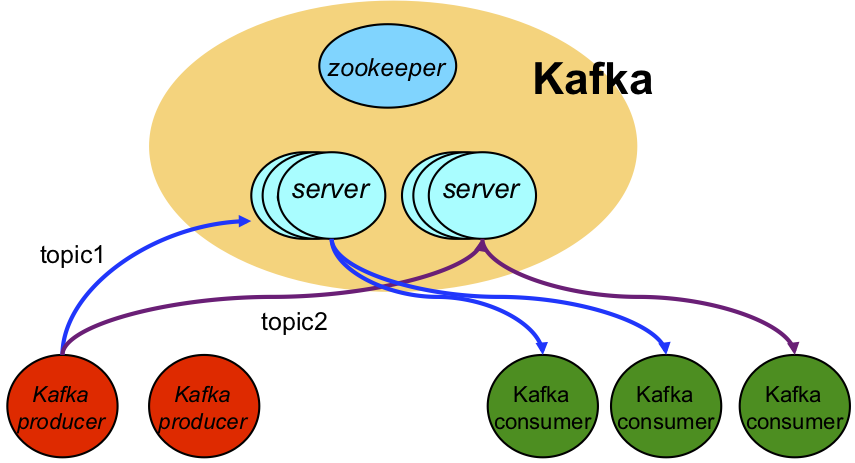
Kakfa is an open-source distributed event streaming platform.
Events are persisted in a persistent log, stored in stable secondary stable memory (disk).
For performance reasons, for each topic, the event log can be partitioned.
For each topic, events are totally ordered within a given partition.
The event record offset defines the ordering of an event within a given partition.
For topics that use more than one partition, events are partially ordered.
<dependencies>
    <dependency>
        <groupId>org.apache.kafka</groupId>
        <artifactId>kafka-clients</artifactId>
        <version>2.8.1</version>
    </dependency>
</dependencies>
static final String TOPIC = "mytopic";
static final String KAFKA_BROKERS = "localhost:9092";
static final String EVENT_DATA_STR = "some event data";

var props = new Properties();
props.put(ProducerConfig.BOOTSTRAP_SERVERS_CONFIG, KAFKA_BROKERS);

props.put(ProducerConfig.KEY_SERIALIZER_CLASS_CONFIG, StringSerializer.class.getName());
props.put(ProducerConfig.VALUE_SERIALIZER_CLASS_CONFIG, StringSerializer.class.getName());

var publisher = new KafkaProducer<String, String>(props);
KafkaProducer represents the event publisher.
To create the publisher we need some configuration properties.
There are more configuration properties that provide fine control over the behavior of the publisher
var publisher = new KafkaProducer<String, String>(props);

var promise = publisher.send( new ProducerRecord<>(TOPIC, EVENT_DATA_STR));
var metadata = promise.get();

long offset = metadata.offset();
Events are published as producer records.
We need to provide:
The send operation is asynchronous and only returns a future that will hold the event record metadata after completion.
To block until the send is completed, we call get() on the metadata future.
The event record metadata contains some useful information about the event, including its offset.
static final String MY_GROUP_ID = "my_group_id";
static final String REPLAY_FROM_BEGINNING = "earliest";
static final String KAFKA_BROKERS = "localhost:9092, kafka:9092";

var props = new Properties();

props.put(ConsumerConfig.BOOTSTRAP_SERVERS_CONFIG, KAFKA_BROKERS);
props.put(ConsumerConfig.KEY_DESERIALIZER_CLASS_CONFIG, StringDeserializer.class.getName());
props.put(ConsumerConfig.VALUE_DESERIALIZER_CLASS_CONFIG, StringDeserializer.class.getName());

props.put(ConsumerConfig.GROUP_ID_CONFIG, MY_GROUP_ID );
props.put(ConsumerConfig.AUTO_OFFSET_RESET_CONFIG, REPLAY_FROM_BEGINNING);

var consumer = new KafkaConsumer<String, String>(props);
KafkaConsumer represents the event subscriber.
To create the subscriber we need some configuration properties.
There are more configuration properties that provide fine control over the behavior of the subscriber.
static final String TOPIC = "mytopic";

var consumer = new KafkaConsumer<String, String>(props);

consumer.subscribe(List.of(TOPIC));

consumer.poll(Duration.ofSeconds(10)).forEach( System.out::println );
The consumer can subscribe to multiple topics, supplied as a list.
Events are notified as consumer records.
The event record contains the event data: key and value, as well as, metadata,
namely, the topic it belongs to, and the offset, within the topic partition.
Consuming events is a blocking operation: poll blocks for a period of time;
and, returns
the list of events, ordered according to the semantics:
Zookeeper provides hierarchical tuple space that stores information in a reliable and strongly consistent way.
Some relevant aspects of zookeeper:
There are several kinds of znodes.
Ephemeral nodes are deleted automatically when the client session/connection that created them is broken;
Persistent_Sequential and Ephemeral_Sequential are nodes whose names are generated automatically in a strictly increasing order.
<dependency>
    <groupId>org.apache.zookeeper</groupId>
    <artifactId>zookeeper</artifactId>
    <version>3.8.0</version>
</dependency>
static final int TIMEOUT = 5000;

var connectedSignal = new CountDownLatch(1);

client = new ZooKeeper(host, TIMEOUT, (e) -> {
    if (e.getState().equals(Watcher.Event.KeeperState.SyncConnected)) {
        connectedSignal.countDown();
});

connectedSignal.await();
// client is now connected...
Connection to the Zookeeper server is asynchronous and go throw multiple states.
A countdown latch can be used as barrier to only proceed once the connection event is notified.
public String createNode(String path, byte[] data, CreateMode mode) {
    try {
        return client.create(path, data, ZooDefs.Ids.OPEN_ACL_UNSAFE, mode);
    } catch (KeeperException.NodeExistsException x) {
        return path;
    } catch (Exception x) {
        return null;
    }
}
Example usages:
createNode("/path", new byte[0], CreateMode.PERSISTENT)

var new_path = createNode("/path", new byte[0], CreateMode.EPHEMERAL_SEQUENTIAL)
To create a tuple using a client in a connected state, we supply:
For EPHEMERAL_SEQUENTIAL zknodes the name is created automatically by Zookeeper and is returned by the creation operation.
public List<String> getChildren(String path) {
    try {
        return client.getChildren(path, false);
    } catch (Exception x) {
        x.printStackTrace();
    }
    return Collections.emptyList();
}
public List<String> getChildren(String path, Watcher watcher) {
    try {
        return client().getChildren(path, watcher);
    } catch (Exception x) {
        x.printStackTrace();
    }
    return Collections.emptyList();
}
Example usage:
getChilden("/path", (e) -> {
    // something under '/path' changed...
});
Download and study the sample project provided.
Start Kafka with the provided script.
sh start-kafka.sh localhost
Edit KafkaSender and KafkaReceiver and replace the KAFKA_BROKERS constant to "kafka:9092"
Start Kafka with the provided script.
sh start-kafka.sh kafka
Build the docker image
mvn clean compile assembly:single docker:build
Run KafkaReceiver
docker run -t --network=sdnet sd2122-aula10-kafka java -cp /home/sd/sd.jar sd2122.aula10.kafka.examples.KafkaReceiver
Run KafkaSender
docker run -t --network=sdnet sd2122-aula10-kafka java -cp /home/sd/sd.jar sd2122.aula10.kafka.examples.KafkaSender msg
The provided SyncPoint class is a generic version of the code presented in lectures.
Check TotalOrderExecutor class on how to use SyncPoint class.
Download and study the sample project provided.
Start Zookeeper with the provided script. Note that zookeeper is packaged with kafka.
sh start-kafka.sh kafka
Execute the sample Zookeeper client code.
docker run -t --network=sdnet sd2122-aula10-zookeeper