Dropbox API Referece
In the end of this lab you should be able to:
Many online services only allow access through secure channels with client authentication.
OAuth allows users to provide access to resources stored in an external service (eg., Dropbox) to be accessed securely by some other application, without sharing the users' credentials.
Applications that wish to use user’s resources in some external service must register with that service.
For example, a web application designed to access the user's own Dropbox will have to be a registered application at Dropbox.
• This step creates the authentication pieces for that specific application: API KEY and API SECRET
-- required arguments for the Dropbox API.
To autorize an web application, the user is required to authenticate with the external service and only then enable access to its resources to that particular application.
For example, if the external service is Dropbox...
If the login is sucessful, the user is presented with a dialog to review and agree to the type of access being asked by the web application to her Dropbox account;
This authorization process returns an ACCESS TOKEN for the (user, web application) pair. -- this token included in the Dropbox API requests, authenticates the web application.
The user's Dropbox account credentials are not shared with the web application!
In this course, we will make it simpler by combining the two prior steps.
Basically, we will generate the API KEY, API SECRET and ACCESS TOKEN offline.
This is often possible when the developer of the application accessing the external service via OAUTH is authorizing access to her own account.
Create a Dropbox App here
Retrieve your App Key, App secret and generate the Access Token
-- default values are fine.
Your Dropbox apps can be managed here. Use this console to delete an app, or to find its OAuth details again.
Dropbox API is very well documented.
The API is REST-like but does not follow exactly REST conventions, including those adopted in this course.
Some important observations:
Most operations in the API are POST operations, using the body of the HTTP request to pass arguments to operations;
Requests often require HTTP headers, in some cases also to pass arguments;
Successful requests return OK on success; they do not return NO_CONTENT on void.
Analyze and follow the documentation carefully to avoid receiving 400 BAD REQUEST replies from the service.
-- When this happens, the reply body usually provides an explanation of why the operation failed.
Note: Read the API documentation carefully! The Dropbox API is very strict and will return BAD REQUEST to malformed requests.
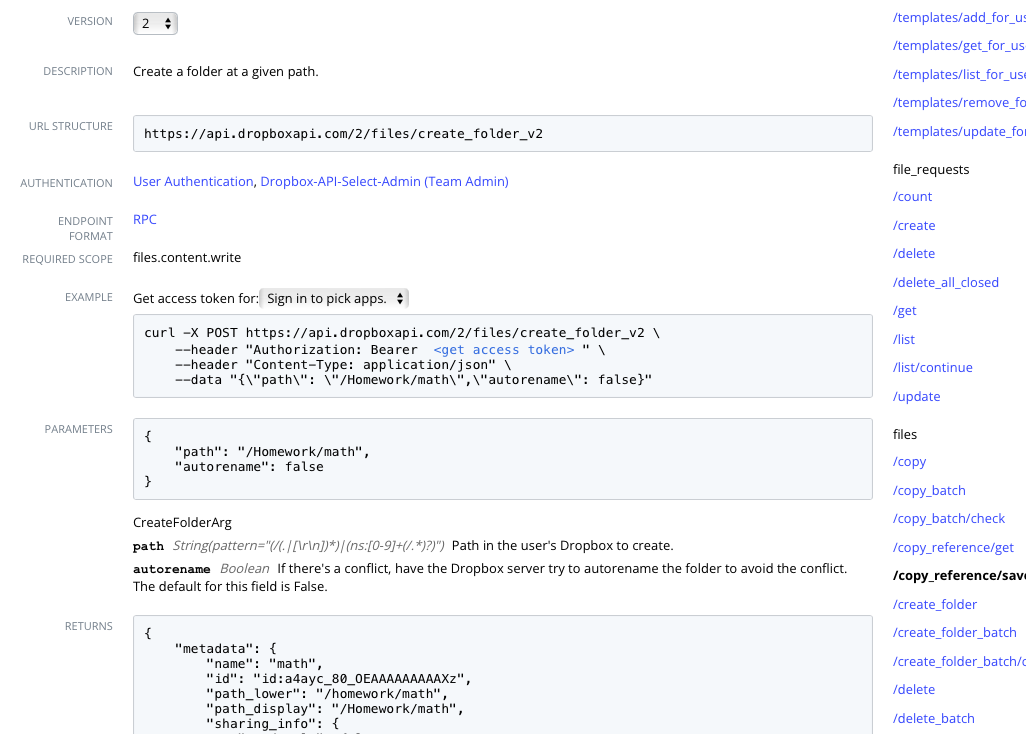
To create a new Dropbox folder, we use the /create_folder endpoint.
Key pieces of information, as detailed in the documentation:
The endpoint URL: https://api.dropboxapi.com/2/files/create_folder_v2
The parameters and the result, are both encoded as JSON,
matching
the required Content-type: application/json request header,
as part of the HTTP request.
{
    "autorename": false,
    "path": "/Homework/math"
}
{
    "metadata": {
        "id": "id:a4ayc_80_OEAAAAAAAAAXz",
        "name": "math",
        "path_display": "/Homework/math",
        "path_lower": "/homework/math",
        "property_groups": [
            {
                "fields": [
                    {
                        "name": "Security Policy",
                        "value": "Confidential"
                    }
                ],
                "template_id": "ptid:1a5n2i6d3OYEAAAAAAAAAYa"
            }
        ],
        "sharing_info": {
            "no_access": false,
            "parent_shared_folder_id": "84528192421",
            "read_only": false,
            "traverse_only": false
        }
    }
}
In Java, OAuth requests are straightforward using a third party library, such as ScribeJava
ScribeJava requires additional Maven dependencies in the project's pom.xml
<dependency>
    <groupId>com.google.code.gson</groupId>
    <artifactId>gson</artifactId>
    <version>2.9.0</version>
</dependency>
<dependency>
    <groupId>com.github.scribejava</groupId>
    <artifactId>scribejava-apis</artifactId>
    <version>8.3.1</version>
</dependency>
<dependency>
    <groupId>org.pac4j</groupId>
    <artifactId>pac4j-oauth</artifactId>
    <version>5.4.3</version>
</dependency>
Gson is JSON encoder/decoder library from Google. Will be used to encode operation arguments and decode the results.
The other two dependencies are for ScribeJava.
private static final String apiKey = "INSERT YOURS";
private static final String apiSecret = "INSERT YOURS";
private static final String accessTokenStr = "INSERT YOURS";

var json = new Gson();
var accessToken = new OAuth2AccessToken(accessTokenStr);
var service = new ServiceBuilder(apiKey).apiSecret(apiSecret).build(DropboxApi20.INSTANCE);
We simply represent arguments as Java records that we later encode into JSON.
public record CreateFolderV2Args(String path, boolean autorename) {
}
private static final String CONTENT_TYPE_HDR = "Content-Type";
private static final String JSON_CONTENT_TYPE = "application/json; charset=utf-8";


var createFolder = new OAuthRequest(Verb.POST, CREATE_FOLDER_V2_URL);
createFolder.addHeader(CONTENT_TYPE_HDR, JSON_CONTENT_TYPE);

var json_args = json.toJson(new CreateFolderV2Args(directoryName, false);
createFolder.setPayload( json_args ));

service.signRequest(accessToken, createFolder);
The signRequest call appends the HTTP header: Authorization: Bearer ... to the request
described in Dropbox API. Without it the operation will fail.
private static final int HTTP_SUCCESS = 200;

var response = service.execute(createFolder);
if (response.getCode() != HTTP_SUCCESS)
    throw new RuntimeException(String.format("Failed to create directory: %s, Status: %d, \nReason: %s\n",
                                             directoryName, response.getCode(), response.getBody()));
The response let us know what happened via the HTTP status code.
If the operation failed, the HTTP body explains why.
A quick way to get the result is to decode it from JSON into some kind of Java Map.
var result = json.fromJson( r.getBody(), HashMap.class);
System.out.println( result);
Often it more convenient to decode the result into some specific Java class that models the response exactly.
var result = json.fromJson( r.getBody(), SomeClass.class);
System.out.println( result);
Check the sample code provided for this class for an example, using the ListFolder endpoint.
In some operations the result is not encoded as JSON, and we need the raw binary response,
for instance when downloading a file. In such cases, the result is available from the response as a stream.
var in = r.getStream();