HTTPS - Protocol overview
In the end of this lab you should be able to:
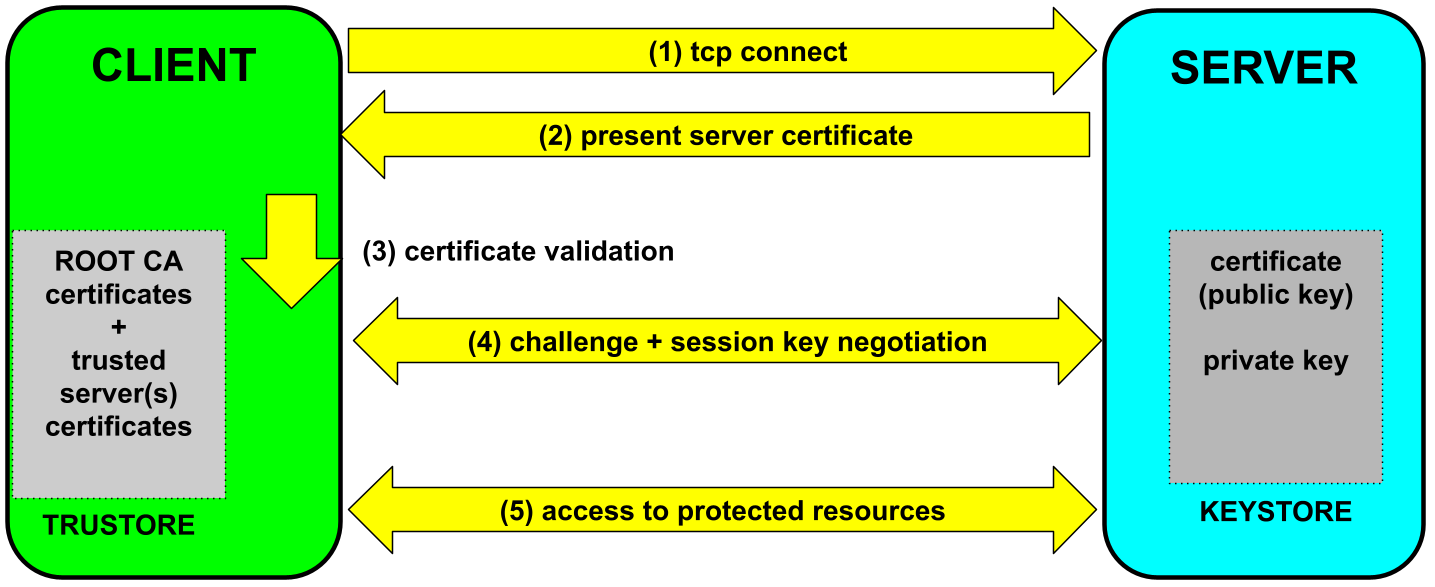
The server has a (password protected) keystore holding its public key certificate and the corresponding private key.
The client has a (password protected) truststore holding root CA certificates and assorted server certificates. These are trusted implicitly. Every other certificate is only trusted after validating the entire certificate chain.
Upon client connection, the server presents its certificate.
If the server certificate passes validation, the client challenges the server to prove its identity. To respond to the challenge successfully, the server needs to use its private key. By the end, of the process, client and server share a secret key that will be used to encrypt all traffic exchanged for the rest of the session.
static final int PORT = 8080;
static final String SERVER_URI_FMT = "https://%s:%s/rest";

var config = new ResourceConfig();
config.register(UsersResource.class);

var ip = InetAddress.getLocalHost().getHostAddress();
var serverURI = URI.create(String.format(SERVER_URI_FMT, ip, PORT));
JdkHttpServerFactory.createHttpServer( serverURI, config, SSLContext.getDefault());
Two changes are needed:
static final int PORT = 8080;

var ip = InetAddress.getLocalHost().getHostAddress();

var server = HttpsServer.create(new InetSocketAddress(ip, PORT), 0);

server.setExecutor(Executors.newCachedThreadPool());
server.setHttpsConfigurator(new HttpsConfigurator(SSLContext.getDefault()));

var endpoint = Endpoint.create(new SoapUsersWebService());
endpoint.publish(server.createContext("/soap"));

server.start();
The SOAP endpoint needs to be created and then published to a HTTPS server.
The server needs to be configured to use a TLS/SSL context.
Ao código acima, foi adicionada a linha:
server.setExecutor(Executors.newCachedThreadPool());
Sem esta linha, o servidor apenas atende um pedido de cada vez.
Normally, nothing is required to use https client-side.
However, when servers use insecure self-signed certificates, the default validation procedure will fail.
To override the default validation procedure (and risk it), the minimal requirement is to set the global HostnameVerifier, like so:
HttpsURLConnection.setDefaultHostnameVerifier(new InsecureHostnameVerifier());
Used once and before the first request.
public class InsecureHostnameVerifier implements HostnameVerifier {
    public boolean verify(String hostname, SSLSession session) {
        return true;
    }
}
Normally, clients are invoked as usual...
However, a truststore is needed when clients call insecure servers, which have self-signed certificates.
java -Djavax.net.ssl.trustStore=<truststore-filename>
-Djavax.net.ssl.trustStorePassword=<truststore-password> -cp ... <classname>Servers require the location of the keystore file used to populate the TLS/SSL context.
The keystore is password protected, so the password to open the keystore is also needed.
java -Djavax.net.ssl.keyStore=<keystore-filename>
        -Djavax.net.ssl.keyStorePassword=<keystore-password> -cp ... <classname>
For servers that are also clients, both the keystore and truststore are needed.
java -Djavax.net.ssl.keyStore=<keystore-filename>
        -Djavax.net.ssl.keyStorePassword=<keystore-password>
        -Djavax.net.ssl.trustStore=<truststore-filename>
-Djavax.net.ssl.trustStorePassword=<truststore-password> -cp ... <classname>Java comes with keytool - a CLI utility to manage keystores and truststores.
Can be used to generate public/private key pairs and add to keystores,
export public key certificates, and import them into truststores.
To create a public/private key pair use:
keytool -genkey -alias <server-name> -keyalg RSA -validity 365 -keystore <keystore-filename> -storetype pkcs12This generates a new key pair for a server: <server-name>, which is stored in keystore: keystore-filename
The program will ask for a password, either to create the keystore or to open it for modification.
To export a self-signed certificate for a server <server-name>, whose public/private key pair is already
present in a keystore, use:
keytool -exportcert -alias <server-name> -keystore <keystore-filename> -file <file-certificate>Again, the command will prompt for the password of the keystore to be able to open it.
The default Java truststore cacerts contains just a list of root CA certificates.
These are certificates issued by "Certification Authorities" that Java trusts implicitly.
They are stored in a file named cacerts included in every JDK and JRE distribution.
The default cacertspassword is changeit.
A truststore is a collection of trusted certificates.
To accept self-signed certificates, add them to a truststore, like so.
keytool -importcert -file <file-certificate> -alias <server-name> -keystore <truststore-filename>Again, the command will prompt for the password to be able to open the truststore.
Note that for keytool, a truststore is just a special kind of keystore, that stores
certified public keys (certificates).
If a client needs to access both insecure servers and secure services,
such as Dropbox ou Google drive, it will need to use a modified
cacerts truststore.
For that, make a copy of cacerts and add the self-signed certificates
using keytool, as describeb above.
keytool.gen_certificates.sh script.